📖 Version 3.0 — Now an All-In-One Ministry Suite

Deep Theological Study.
Distraction-Free Manuscript Writing.

A comprehensive desktop suite built around the real weekly rhythm of ministry — Scripture study with Word Study and six classic commentaries, sermon and slide building, a preaching calendar with pastoral care built in, offline text-to-speech, and private AI brainstorming. All in one focused space, running entirely on your own computer.

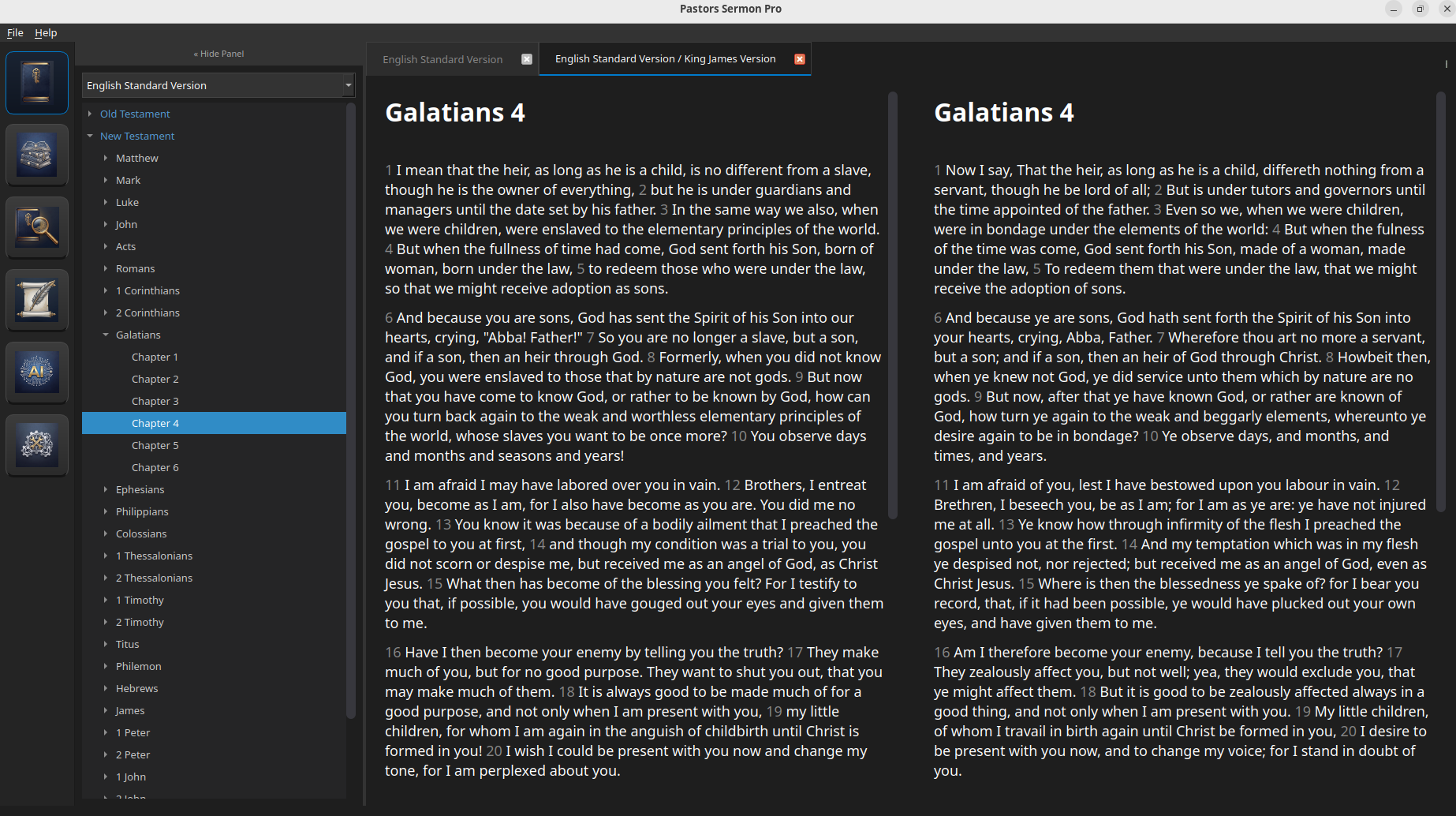
Pastor's Sermon Pro v3.0 - Workspace View
Pastor's Sermon Pro parallel scripture reader interface Mockup

A Complete Studio Built for the Pulpit

No subscriptions, no complex database syncing, and no distracted tabs. From first read-through to Sunday's bulletin, it's all here — and it all runs offline.

Extensive Bible Library

Instant access to dozens of Bible versions with full formal names (ESV, NASB, NKJV, NIV, ASV, and more).

Compare multiple translations side-by-side in parallel tabs to identify linguistic nuances and deep translation details instantly.

  • Multi-translation Parallel View
  • Instant Canon Index Search
  • Verse Highlighting & Chapter Notes

Word Study & Bundled Commentaries

Open a Strong's-tagged interlinear view for any chapter, with red-letter text and one-click definitions from a local Strong's dictionary.

Read six classic, public-domain commentaries verse-by-verse right alongside the text — no internet connection required.

  • Strong's Numbers & Interlinear Text
  • Matthew Henry, Gill, Calvin, Clarke, JFB, Keil & Delitzsch
  • 100% Local — Nothing Downloaded on Demand

Sermon Builder Workspace

Write your sermon manuscript in a custom rich-text editor with a live Bible reference pane open right beside it — no tab-switching required.

Type a reference like [John 3:16] and the full verse is inserted automatically. Tag each sermon with a series and part number to keep everything organized.

  • Auto Scripture Insertion
  • Series & Part Tracking
  • Export to ODT and PDF

Slide Builder & Presenter Mode

Build a slide deck right next to your manuscript with Title, Bullet List, and Scripture layouts, custom backgrounds, and one-click verse insertion.

Let the AI Assistant generate a first-draft deck straight from your finished sermon, then launch a fullscreen Presenter Mode for the service.

  • AI "Generate from Sermon"
  • Fullscreen Presenter Mode
  • Export to PDF or Editable ODP

AI Sermon Assistant

Leverage AI assistance for brainstorming, outline drafting, and word research — with your choice of how it runs.

Use fully private Local Mode with complete offline isolation, or connect your own API key for Google Gemini, Anthropic Claude, or OpenAI ChatGPT in Online Mode — your choice, never required.

  • Privacy-First Local Offline Mode
  • Optional Online Mode (Gemini / Claude / ChatGPT)
  • Fetches Your Provider's Live Model List

Preaching Calendar & Pastoral Care

A ministry planning hub built right in — see every sermon, series, and scheduled event on one calendar, marked in green or red at a glance.

Prayer requests and per-person visitation history live on the same calendar too, instead of a separate tool to maintain.

  • Sermon Series Scheduling
  • Prayer Request & Visit Tracking
  • Built-In Bible Reading Plans

Bulletin Builder

Build a printable order-of-service for any date — add, reorder, and time each item with a running duration total.

Pull that date's sermon title and passage in with one click, then export a clean, ready-to-print PDF.

  • Timed Order-of-Service Items
  • One-Click Sermon Info Import
  • Print-Ready PDF Export

Offline Listen (Text-to-Speech)

Have any chapter read aloud with a local neural voice — not a cloud service, and not your operating system's default robotic voice.

Select a tricky name and right-click "Pronounce" to hear just that word. Chapters you've listened to before play back instantly from a local cache.

  • Fully Offline Neural Voice
  • Right-Click "Pronounce" for Any Word
  • Instant Cached Replay

Sermon Library & Searchable Notes

Every sermon you save is automatically registered in a searchable library — find any past sermon by title, subject, passage, date, or series in seconds.

Write notes on any chapter, then browse and search every note you've ever taken from one place.

  • Auto-Indexed Sermon Archive
  • Searchable Notes Across the Whole Bible
  • Per-Chapter Annotations

Personal Reference Library

Study with built-in classical reference books including Easton's Bible Dictionary and Thompson Chain Topics.

Build your theological database by adding your own library of PDF and ePub reference books to read right next to Scripture.

  • Easton's Bible Lexicon
  • Custom ePub / PDF Sidebar
  • Thompson Chain Reference

Designed with Visual Polish

Click through the primary interfaces below to experience the streamlined layout and responsive dynamic theming.

Pastor's Sermon Pro Main Screen with Parallel Bible Reader
The main workspace showing the English Standard Version side-by-side with chapter notes and the theological study sidebar.

Hardware-Aware AI Optimization

Prefer to run AI locally? Pastor's Sermon Pro can size a model to your hardware automatically. Choose the best local setup with this interactive recommendations calculator — or skip local setup entirely and connect your own Gemini, Claude, or ChatGPT API key in Online Mode instead.

Select Your PC Specs

Adjust your hardware profile below to compute the optimum localized settings.

Recommended Setup Configuration
Computing optimum setup...
Recommended Mode
Local / Offline
Average Response Speed
-- t/s

Selecting your specifications will instantly display the optimum model weights and hardware-accelerated modes.

🛡️ Your Study remains 100% Private

Unlike subscription software, your thoughts, references, outlines, and manuscripts are never uploaded, parsed, or processed on corporate servers. Bible text, commentaries, Word Study, text-to-speech, notes, and your preaching calendar all run with complete internet isolation. The one exception is Online AI Mode — entirely opt-in, and only active if you choose to enter your own API key.

A Mission-Driven Desktop Study App

Pastor's Sermon Pro began as a dedicated endeavor by Michael Howard to solve a real-world problem: providing pastors and teachers with a completely private, offline, and distraction-free pulpit workspace. It has since grown into a full ministry suite — Bible study, sermon and slide writing, preaching calendar, pastoral care, and bulletins — while keeping every manuscript and note strictly local.

This software is 100% community-supported and completely free of telemetry, data harvesting, and locking subscriptions. If Pastor's Sermon Pro streamlines your weekly study and helps focus your preparation, consider partnering with its development.

☕ Support on Ko-fi
💖 Community Supported
100%
Private & Free of Ads

Every donation directly finances offline theological datasets, cross-platform performance profiling, and privacy-first local AI architectures.

Install Pastor's Sermon Pro

Download the package for your preferred operating system. Fully featured out-of-the-box.

Windows Edition

Complete installer package supporting Windows 10 and 11. Includes all core dictionaries and side-by-side Scripture engines.

  • Installer File PastorsSermonPro_Setup.exe
  • Payload Size ~172 Megabytes
  • Minimum OS Windows 10 (64-bit)
  • Recommended Spec 8GB RAM | Dedicated GPU
Download Setup (.exe)

Linux Edition

Optimized light package for Ubuntu and Debian-based Linux architectures. Background models are fetched on-demand.

  • Package Format Self-Extracting Installer (.run)
  • Payload Size ~160 Megabytes
  • Minimum OS Ubuntu 20.04 LTS / Debian 11
  • Prerequisites None — Fully Self-Contained
Download Linux Installer (.run)

🐧 Linux Quick Launch Instructions

To install the application system-wide on your Linux distribution, run the self-extracting installer in your terminal:

chmod +x PastorsSermonPro_Installer.run && ./PastorsSermonPro_Installer.run

Note: Optional AI models are downloaded directly inside the application interface in the background, keeping the initial payload download light.

Frequently Asked Questions

Find immediate answers to licensing, data privacy, dictionaries, and specifications.

Is the AI Assistant mandatory or subscription-based?

No. The AI assistant is entirely optional. Pastor's Sermon Pro operates beautifully as a fully functional parallel Scripture workspace, manuscript editor, and personal library viewer without the AI assistant ever being enabled. There are zero subscription fees; you can choose fully local offline mode, or connect your own Gemini, Claude, or ChatGPT API key in Online Mode if you'd rather use a cloud model.

Where are my sermons and theological notes saved?

Everything is saved locally on your computer. Your sermon manuscripts, outlines, slides, bulletins, prayer requests, notes, and local library files remain securely in offline application folders on your hard drive. No sermon draft or manuscript is ever sent to or parsed by external servers — the one exception is if you choose to enable Online AI Mode with your own API key, in which case only what you send the assistant leaves your machine.

Which Bible translations, lexicons, and commentaries are available?

Dozens of formal Bible translations are supported out of the box, including the ESV, NKJV, NASB, NIV, and ASV. For deeper study, the app includes a Strong's-tagged Word Study/interlinear view, Easton's Bible Dictionary, Thompson Chain Topics, and six bundled commentaries (Matthew Henry, Jamieson-Fausset-Brown, John Gill, Adam Clarke, John Calvin, and Keil & Delitzsch) — all stored locally. You can also add your own ePub and PDF study books directly.

How does the background AI Model Downloader work?

Instead of manually scouring the web for model weights, Pastor's Sermon Pro has a built-in downloader for Local Mode. Simply open your Settings tab, select the model recommended for your RAM size, and the app downloads it in the background. You can continue reading and writing sermons undisturbed while tracking progress in the window status bar. Prefer not to download a local model at all? Switch to Online Mode instead and use your own Gemini, Claude, or ChatGPT API key — Settings can even fetch the live list of models available to your key.

Is the offline text-to-speech voice any good?

The "Listen" feature uses a local neural voice — not your operating system's built-in robotic voice, and not a cloud service. It's under active refinement for pacing and naturalness, and improves with each update. The first time you listen to a chapter it needs a little time to generate; after that it's cached and plays back instantly.

How do I update the application?

The application features an integrated Update Manager that matches local version numbers against the latest stable repository releases. You will receive a clean notification prompt when updates are available, letting you download and trigger the setup with a single click.